

Running an online business alone means wearing every hat in the company.
One day you’re drafting long-form guides. The next day you’re auditing Search Console metrics, fixing PHP errors on WordPress, designing visual assets in Canva, building an API automation, or troubleshooting why a workflow that worked yesterday suddenly broke.
You don’t have an IT department, a dedicated content team, or an SEO specialist sitting in the next room. Most of the time, it’s just you.
That’s precisely why your software stack matters. Over time, I’ve battle-tested and refined a lean toolkit that handles the bulk of my operational heavy lifting:
ChatGPT, Claude, Gemini, Notion, WordPress, Canva, Google Search Console, Google Analytics 4, n8n, and Hostinger.
I don’t collect shiny new AI apps for fun. I use them because every tool holds a non-negotiable role in my daily workflow.
A great software stack shouldn’t be a pile of expensive monthly SaaS bills—it should operate as an integrated system that scales your output.
The High-Level Architecture: How My Stack Functions
My architecture stays intentionally lean. At its core, my business runs on a simple three-tier loop:
AI & Creation Engine --> Publishing & Visual Layer --> Automation & Analytics Loop- AI Tools (ChatGPT, Claude, Gemini): Handle ideation, deep research, document analysis, and problem-solving.
- WordPress & Canva: Serve as my content delivery and visual asset layer.
- Search Console & GA4: Provide real-time data on how my audience interacts with published assets.
- n8n: Acts as the central nervous system, connecting apps and killing repetitive manual tasks.
- Hostinger: Provides the fast, reliable hosting infrastructure behind my web properties.
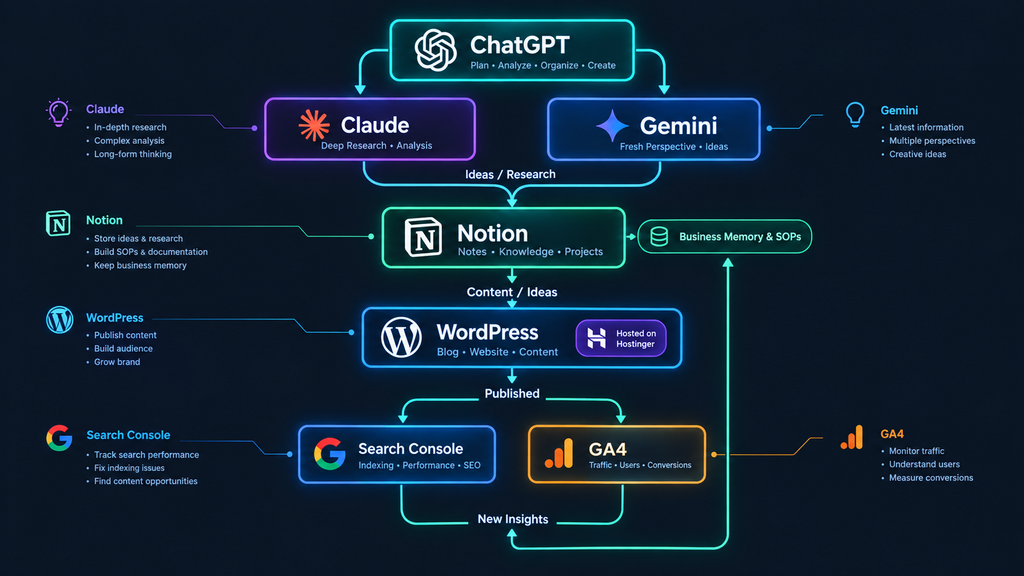
Deep Dive: Breaking Down My 10 Essential Tools
1. ChatGPT: The Primary Co-Pilot & Logic Engine
ChatGPT remains my most frequently opened tab. However, writing articles is actually a tiny fraction of what I use it for.
I leverage ChatGPT to:
- Outline complex content series and develop fresh angles.
- Debug code snippets, rewrite regex rules, and refactor scripts.
- Transform messy, unstructured voice notes into clean outlines.
- Design step-by-step prompt engineering templates.
Here’s the kicker: It stops you from staring at a blank page. You throw raw, unformed ideas at it, and it gives you a structured foundation to refine. I never treat raw AI output as a finished piece—it speeds up my execution without replacing my editorial judgment.
2. Claude: Long-Form Writing & Heavy Document Analysis
While ChatGPT acts as my general reasoning engine, Claude takes over when handling massive context windows and complex writing.
I rely on Claude to:
- Review long PDF documents and dense project briefs.
- Re-structure long-form articles while preserving a natural human voice.
- Compare alternative strategic approaches across technical data.
Different AI tools fit different tasks. Asking “Which AI is best?” misses the point. The real question is: “Which tool fits the specific task on my desk right now?”
3. Gemini: The Ecosystem Bridge & Second Opinion
I keep Gemini in my stack because getting a second perspective on complex technical problems pays off. If I map out a logic flow with ChatGPT, passing that same prompt through Gemini often reveals blind spots I missed.
Plus, Gemini integrates natively with Google’s cloud ecosystem, making it a handy assistant when analyzing live search context or Google Docs assets.
4. Notion: My Central Business Memory
Without a centralized knowledge base, your best ideas rot in random text files and browser bookmarks. Notion stores everything I can’t afford to lose.
I use Notion for:
- Content calendars and article backlogs.
- Step-by-step Standard Operating Procedures (SOPs).
- Technical documentation and API workflow maps.
Hands-On Experience --> Clean Documentation --> Reusable SOP --> n8n AutomationInstead of solving the exact same operational headache repeatedly, I document the solution once and gradually turn experience into automated systems.
5. WordPress: The Content & Publishing Engine
AI-generated insights don’t build revenue until they transform into searchable, accessible web assets. WordPress serves as my core publishing infrastructure.
It handles my site architecture, media management, SEO tags, and page rendering. For a solopreneur, your CMS isn’t just a blogging app—it’s your digital storefront.
6. Canva: Frictionless Visual Asset Creation
You don’t need a degree in graphic design to produce professional web visuals. I use Canva for:
- Blog featured images and visual infographics.
- Social media preview cards (Open Graph assets).
- Promotional banners and simple lead magnet layouts.
Canva saves hours by letting me build reusable brand templates. Cutting your visual creation time from 40 minutes down to 10 minutes per post adds up to massive operational savings over a year.
7. Google Search Console: Direct Search Performance Signals
Publishing an article is only half the battle. Once your page hits the web, Search Console reveals how Google actually indexes and ranks your assets.
I track:
- Search query impressions and click-through rates (CTR).
- Indexing errors and core web vitals.
- Unintended search queries that signal brand-new article opportunities.
8. Google Analytics 4 (GA4): Post-Click User Behavior
Search Console tells you how users find you; GA4 reveals what they do after they arrive.
I monitor user engagement metrics, top-performing landing pages, and traffic referral sources. Traffic alone doesn’t pay the bills—understanding user intent helps you double down on content that actually converts.
9. n8n: Self-Hosted Workflow Automation
n8n changes how you approach boring, repetitive tasks. Instead of asking “How can I do this faster?”, n8n lets you ask “How can I stop doing this manually altogether?”
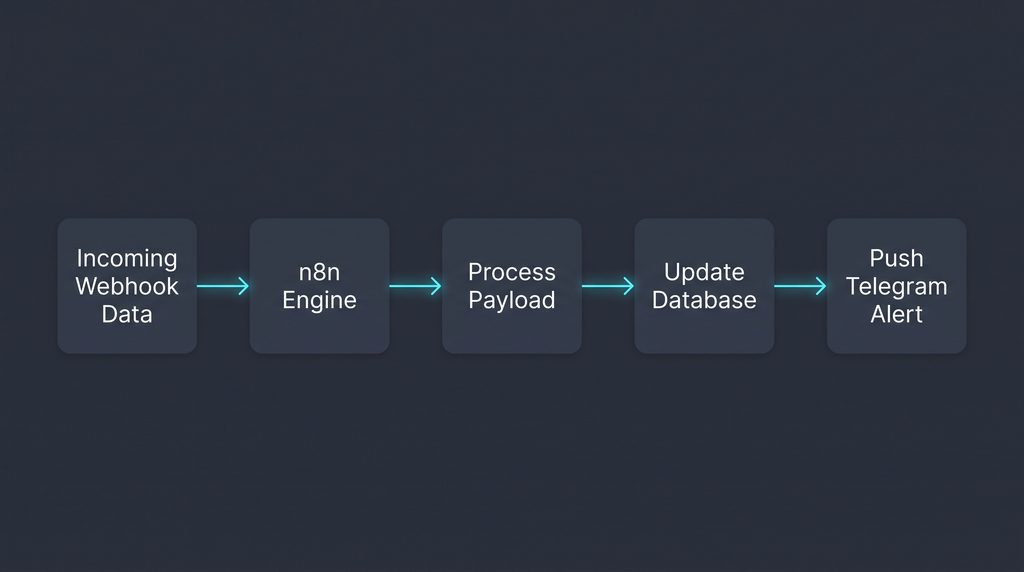
When I catch myself manually moving data between two platforms twice a week, I wire up an n8n node pipeline to handle it automatically.
10. Hostinger: Reliable Infrastructure Underneath
Hosting isn’t as glamorous as AI video tools, but none of your software stack matters if your site goes offline.
Hostinger provides the fast, stable server infrastructure that powers my WordPress installations and web projects. A real solopreneur stack requires reliable, budget-friendly infrastructure just as much as smart AI assistants.
Solopreneur AI Software Stack Comparison Matrix
| Tool Category | Software Used | Primary Operational Job | Pricing Model |
| General AI Reasoning | ChatGPT | Brainstorming, coding, prompt creation | Free / $20/mo |
| Long-Form AI Analysis | Claude | Heavy document reviews & natural drafts | Free / $20/mo |
| Alternative AI | Gemini | Second opinion & Google ecosystem tasks | Free / Paid |
| Knowledge Management | Notion | SOP storage, content hub & business memory | Freemium |
| Publishing CMS | WordPress | Content delivery, SEO layout & site management | Open Source / Free |
| Visual Design | Canva | Template-driven graphics & featured images | Freemium |
| Search Data | Google Search Console | Index tracking & search query discovery | 100% Free |
| Behavioral Analytics | Google Analytics 4 | Visitor engagement & conversion tracking | 100% Free |
| Workflow Automation | n8n | Multi-app integration & task automation | Open Source / Paid |
| Server Infrastructure | Hostinger | Fast web hosting & uptime management | Paid (Budget-friendly) |
What I Refuse to Automate
Technology should eliminate busywork, not replace human judgment. To preserve quality and brand trust, I never automate:
- Final Content Editing: Every published sentence gets a manual human review pass.
- Core Business Decisions: High-level monetization and product strategy remain 100% manual.
- Sensitive Communications: Direct client interactions and community discussions deserve human empathy.
Frequently Asked Questions (FAQ)
Do I need all three AI models (ChatGPT, Claude, Gemini) to start?
Not at all. If you are starting out, pick ChatGPT or Claude. Once your workflow expands and you hit specific limitations, you can add additional tools to your toolbox.
Why choose n8n over Zapier or Make?
n8n gives you incredible flexibility, self-hosting options, and cost predictability when running high-volume tasks that would quickly blow through Zapier’s monthly task limits.
How do I stop spending more time managing software than working?
Follow my 3-question rule before adding any app: What problem does this solve? How often do I hit this problem? Can I solve it using tools I already own?
Final Thoughts
A great AI software stack isn’t about bragging rights or hoarding subscription badges. It’s about leverage.
Use ChatGPT and Claude to process ideas faster, store your learnings in Notion, publish on WordPress, measure results via Google Analytics, and automate repetitive tasks with n8n. Keep your system lean, automate the boring stuff, and spend your saved time building real business value.

I am is an AI Author & Practitioner specializing in AI workflow automation, prompt engineering, and digital productivity. I help solopreneurs and content creators streamline their operations using practical, real-world AI strategies