

When I started running my solo business through software, I thought my biggest struggle would be finding the right applications.
It wasn’t.
My real problem was remembering where I buried everything.
I had business ideas rotting in Google Docs, client notes hidden inside WhatsApp chats, useful links buried in browser bookmarks, content concepts scattered across notes apps, and project files lost in my laptop’s downloads folder.
There was even a moment where I clearly remembered writing a detailed workflow for a task, but I couldn’t remember whether I saved it in Google Docs, Notion, or a local folder.
So I wrote it again from scratch.
That exact moment forced me to realize I didn’t have an information problem. I had a knowledge management crisis.
As a solopreneur, losing information hurts your bottom line. When you operate alone, no colleague exists to remember client details, recall how you solved a bug six months ago, or pull up research notes.
You are the entire company memory.
If that memory scatters across ten different apps, you burn precious hours hunting for assets you already created. However, building a reliable Knowledge Management System (KMS) fixes this completely.
Your goal is simple: Capture useful information once, organize it sensibly, and retrieve it instantly.
Here are the absolute best knowledge management tools I recommend for solopreneurs.
1. Notion: Best for All-in-One Operations
If your business assets currently scatter across a dozen tabs, I recommend starting with Notion.
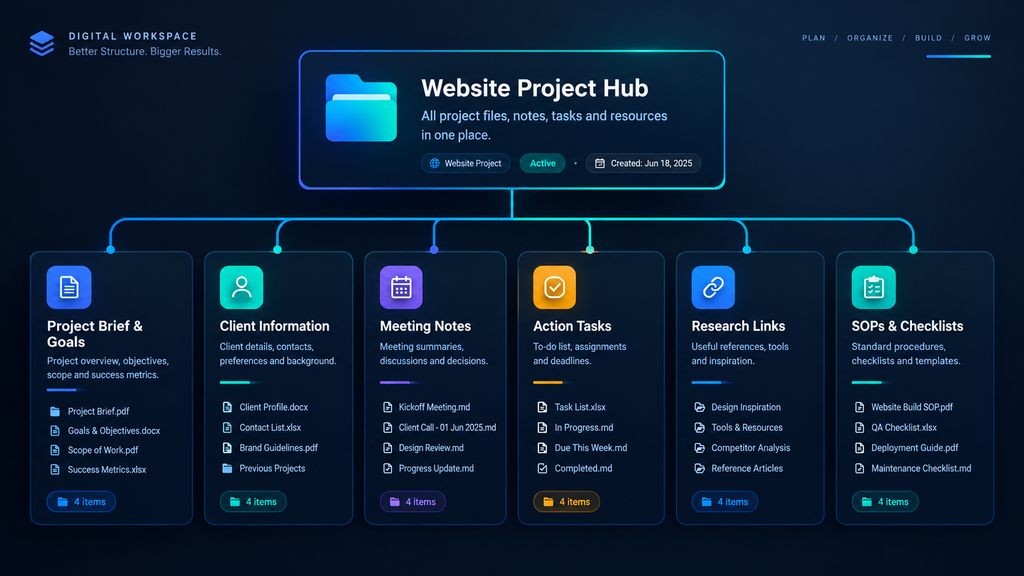
Notion serves as the central operational hub for your business. For instance, when launching a new website project, instead of splitting assets across email threads and cloud drives, you build a single workspace.
A Typical Project Area in Notion:
The Biggest Advantage: Context
Plus, Notion shines because of context. When you return to a project after a chaotic week, you don’t need to rebuild your train of thought from memory. You open your workspace and immediately see:
- What is the core objective?
- Which tasks are pending?
- What did the client request?
- Where live the relevant files?
My Personal Mistake with Notion: I initially over-engineered my workspace. I built complex databases, added dozens of unused tags, and spent more time tweaking layouts than doing real work. Simplify your setup! Five functional pages beat fifty pretty pages you forget exist.
2. Obsidian: Best for Research & Connecting Ideas
While Notion feels like a structured business office, Obsidian feels like a personal research library.
Obsidian excels when you analyze complex topics and need to connect scattered insights. For example, while researching a SaaS product launch, you might explore:
- Pricing models
- Onboarding email sequences
- Automation triggers
- Content marketing strategies
Instead of filing these into separate, disconnected folders, Obsidian lets you link notes together via bi-directional links.
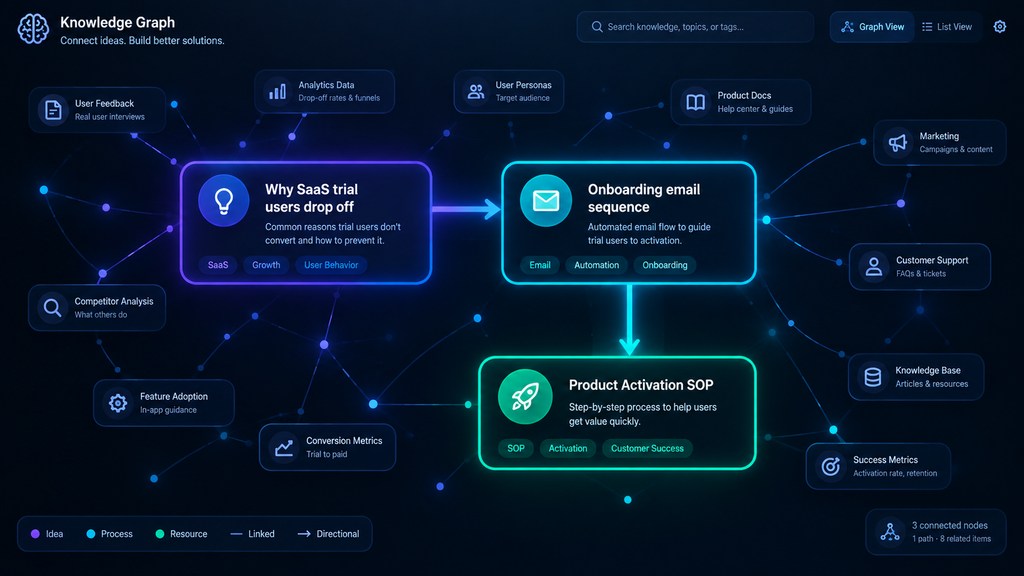
Months later, when you draft an article or launch a campaign, you don’t start from zero. Here’s the kicker: You simply open your graph view and pull up interconnected insights you’ve already researched.
- The Downside: Obsidian customization can become an addictive hobby. Don’t spend your Saturday afternoon tweaking CSS themes instead of driving revenue. Focus on note quality, not setup perfection.
3. Google Drive: Best for Secure Document & File Storage
Even with advanced note systems, I never dump raw files inside my primary note database.
Some assets belong strictly in dedicated cloud file storage:
- Legal contracts & NDAs
- Invoices & receipts
- Raw spreadsheets & financial models
- High-res client deliverables & PDFs
My preferred strategy separates knowledge from files:
Notion (Context & SOPs) ➔ Google Drive (Raw Assets & PDFs)This approach prevents your central knowledge system from turning into a bloated file dump.
- Pro-Tip for Drive Clutter: Stop naming files
Final_Draft_2.pdf. Adopt a strict date-first naming convention:2026-09_ClientName_ProjectName.pdffor instant searchability.
4. OneNote: Best for Traditional Notebook Thinkers
Not every solopreneur enjoys database structures or Markdown syntax. If you prefer opening a visual notebook and writing freely, OneNote delivers a familiar experience.
If you handle heavy meeting logs, handwritten tablet notes, web clippings, and rough sketches, OneNote organizes them neatly into notebook sections. On top of that, if you already pay for a Microsoft 365 subscription, it integrates natively into your daily workflow without added costs.
5. Evernote: Best for Rapid Information Capture
The core test of any capture tool comes down to one question: “Can I save this thought right now and find it in five seconds later?”
Evernote excels at fast, friction-free capturing:
- Web clips & full articles
- Mobile screenshots & receipts
- Quick voice notes & meeting logs
Warning: An inbox easily turns into an information graveyard. If you hoard research without reviewing it, you simply build a bigger digital junk pile. Follow my strict rule: Capture quickly on mobile, review weekly on desktop.
6. Capacities & Tana: Best for Advanced Object-Based Knowledge
If traditional folder trees feel limiting, newer tools like Capacities and Tana treat information as dynamic objects rather than flat text files.
Instead of typing isolated notes, you define connected objects:
- Ideas ➔ Feed Into ➔ Active Projects
- Meetings ➔ generate ➔ Action Items
- Ideas ➔ feed into ➔ Active Projects
- The Verdict: If your business model handles massive amounts of interconnected data, these tools offer unmatched flexibility. However, they come with a steeper learning curve. If you are just starting, stick to Notion or Obsidian first.
Solopreneur Knowledge Tool Comparison Matrix
| Tool | Best Suited For | Primary Strength | Pricing Model |
| Notion | Business hub & operations | Visual project databases & context | Free / Paid |
| Obsidian | Deep research & idea linkage | Local Markdown & bi-directional links | Free / Add-ons |
| Google Drive | Hard file & document storage | Universal cloud access & file security | Free / Paid |
| OneNote | Freeform notebook journaling | Microsoft 365 integration & tablet notes | Free / M365 |
| Evernote | Fast web & receipt clipping | Multi-device web clipper & OCR search | Freemium |
| Capacities | Object-based note structuring | Dynamic relationships between ideas | Free / Paid |
The Simple 4-Folder Architecture That Actually Works
After testing dozens of complex productivity setups, I discovered that solopreneurs don’t need a bloated system. You need a lightweight framework that survives a chaotic week.
I structure my central workspace into four core areas:
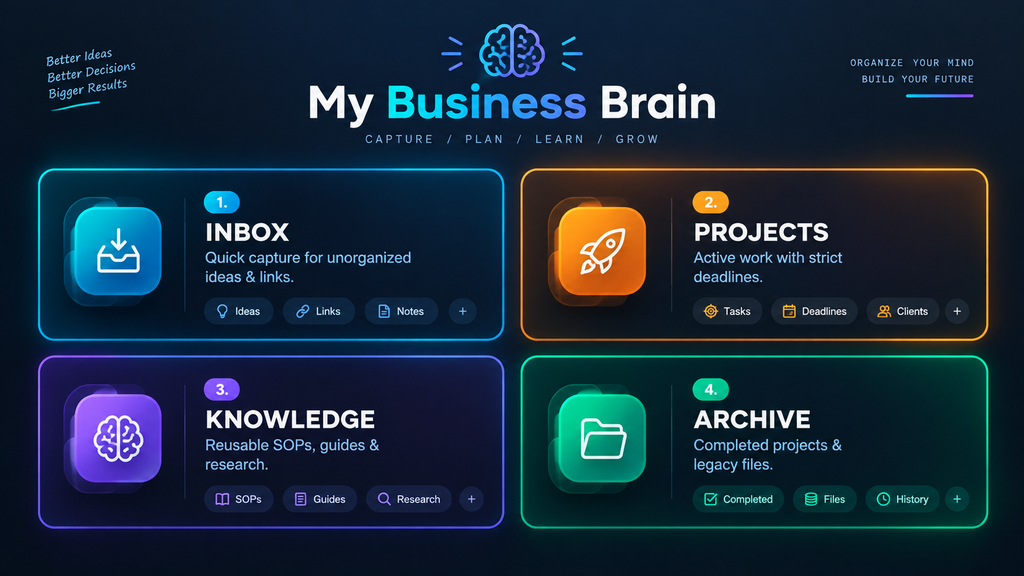
- Inbox: Your temporary dumping ground for fast thoughts, links, and screenshots.
- Projects: Active client work and product launches.
- Knowledge: Your permanent library. Remember: Projects are temporary; Knowledge is reusable.
- Archive: The graveyard for finished projects. Never delete old work—archive it so you can reference past solutions later.
Build Your Business Memory
Your productivity doesn’t skyrocket because you downloaded a magic app. It improves the moment you stop trying to remember everything in your head.
Every time you solve a difficult technical problem or onboard a client, document the exact steps:
Solved Problem
→ Documented Note
→ Reusable SOP
→ Automated Workflow
Eventually, that documented process turns into a standardized operating procedure (SOP). Then, you can convert that SOP into an AI automation workflow. Suddenly, parts of your business run on autopilot without relying on your memory.
Final Thoughts
The best knowledge management tool isn’t the one with the most flashy features—it’s the one you actually open every day.
Pick one tool that fits your natural style. Run it for thirty days. Identify where your workflow stalls, refine your folder rules, and build your digital memory step-by-step.

I am is an AI Author & Practitioner specializing in AI workflow automation, prompt engineering, and digital productivity. I help solopreneurs and content creators streamline their operations using practical, real-world AI strategies