
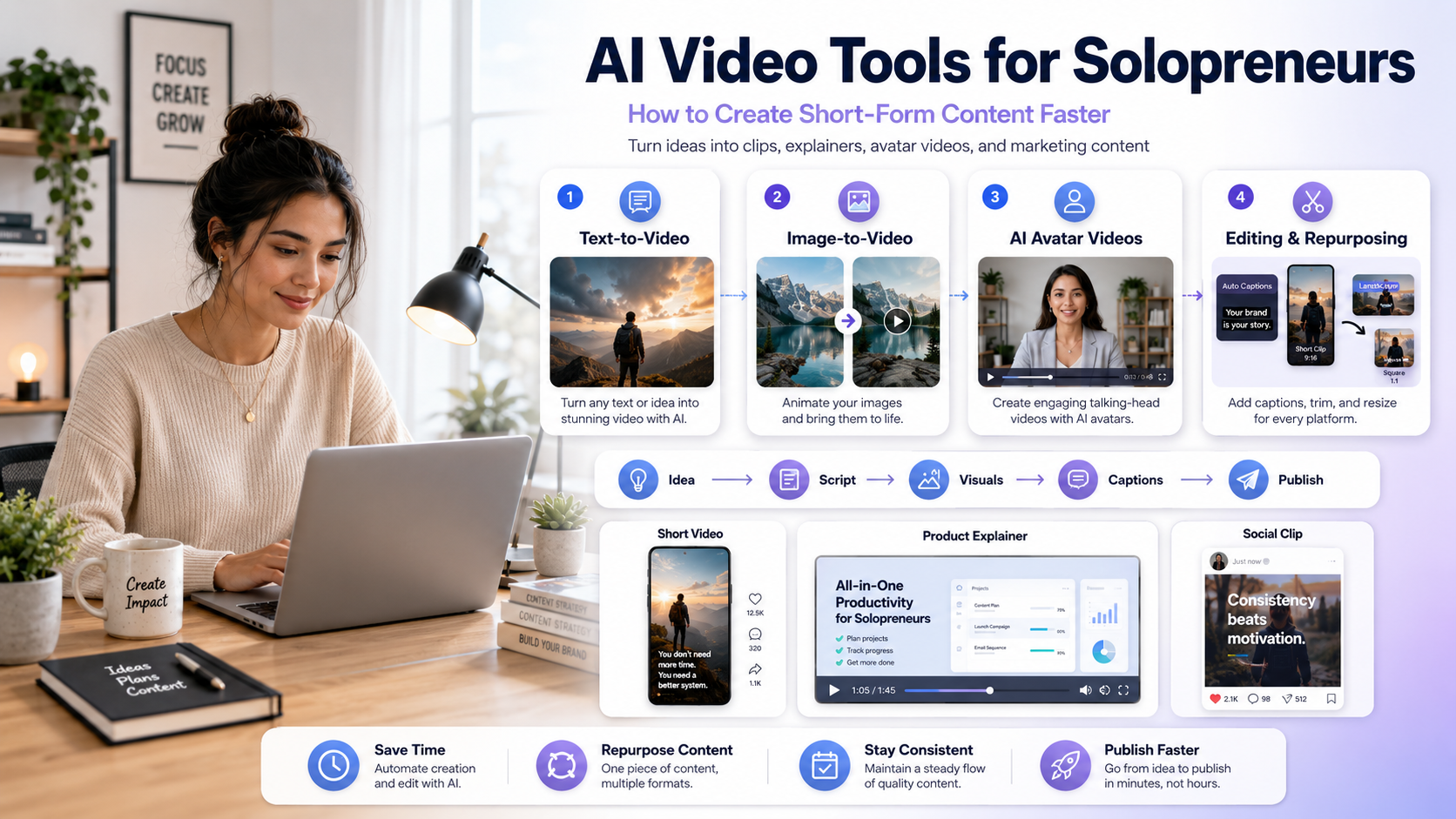
Creating video content used to require a camera, expensive editing software, a scriptwriter, a voiceover artist, and enough patience to wrestle with a video timeline for three hours.
Now, a solopreneur can turn a single written idea into short-form videos, product explainers, social clips, and branded visuals with a small, highly efficient stack of AI video tools.
That does not mean AI should replace your creative strategy. Instead, AI removes the heavy production bottleneck so you can focus on the part that actually matters: your core marketing message. For solo founders, the real question is no longer, “What is the flashiest AI tool?” The better question is: Which tool helps me create the right content faster, with less friction, and without making my brand look like generic internet soup?
Quick Comparison: Best AI Video Workflows
| Use Case | Best Tool Type | Industry Standard Examples | Best For |
| Blog to Video | Text-to-Video Tools | InVideo AI, Runway | Educational clips, summaries |
| Founder Explainers | AI Avatar Tools | HeyGen, Synthesia | Product intros, tutorials, FAQs |
| Animate Graphics | Image-to-Video Tools | Luma Dream Machine, Kling | Brand visuals, product scenes |
| Repurposing Content | AI Clipping Tools | Opus Clip, Munch | Podcasts, YouTube Shorts snippets |
| Fast Visual Polish | AI Editing Tools | Descript, CapCut | Removing silences, auto-captions |
Short on time? Download Free AI Prompt Cheat Sheet (PDF) to save these templates directly to your device, or keep reading for the full breakdown.
The Core AI Video Categories for Solo Founders
Before picking a tool, you need to understand the distinct problem each category solves. Using the wrong tool for the job is a fast track to burning your monthly subscription credits.
1. Text-to-Video Tools (e.g., InVideo AI, Runway)
These platforms turn written scripts, outlines, or blog URLs into fully edited video scenes. They are incredibly useful when you have a strong written argument but do not want to manually search for stock footage, arrange timelines, or record a voiceover from scratch.
- Best for: Rapid social media clips, thought leadership snippets, and quick blog summaries.
- Watch out for: Vague prompts produce boring, generic visuals. Keep your descriptions specific.
2. AI Avatar Presenters (e.g., HeyGen, Synthesia)
AI avatar tools allow you to create talking-head videos without ever stepping in front of a camera. You simply type a script, choose a professional digital presenter, select a realistic voice model, and generate the video.
- Best for: SaaS product walkthroughs, customer onboarding tutorials, and multilingual marketing videos.
- Watch out for: If your script sounds robotic, the avatar will feel stiff. Write exactly how you speak in real life.
3. AI Repurposing & Clipping Tools (e.g., Opus Clip)
If you already produce long-form content like YouTube videos, webinars, or weekly podcasts, this category provides the highest operational leverage. These tools automatically scan long videos, detect the most engaging hooks, extract short vertical clips, and add stylized dynamic captions.
- Best for: Turning a single 15-minute video into two weeks worth of short-form distribution assets for LinkedIn, TikTok, and YouTube Shorts.
Reusable Prompt Templates for AI Video Production
To get high-quality results from your tools, use these pre-tested prompt structures. Copy them directly into your text-to-video or script-generation software.
Prompt Template: Turning a Blog Post into a Social Clip
Turn this written outline into a 45-second vertical video for LinkedIn. Target audience: B2B solo SaaS founders. Tone: practical, clear, and zero hype. Structure: Start with a strong hook about a major problem, provide 3 practical bullet points, and end with a simple call to action. Keep background visuals clean and startup-focused.

Outline: [Paste your text here]
Prompt Template: B-Roll Scene Generation (Image-to-Video)
A close-up cinematic shot of a modern laptop on a wooden desk showing a clean software dashboard. Soft natural lighting, shallow depth of field, subtle camera pan from left to right. Focused, calm productivity mood. No distorted elements, no generic stock-photo feel.
A Simple Weekly Video System for Busy Solopreneurs
Do not try to reinvent the wheel every Monday morning. Use this highly leveraged weekly system to keep your production consistent:
- Monday (The Concept): Choose one clear idea your audience needs to understand in under 45 seconds (e.g., “Why you must validate demand before writing code”).
- Tuesday (The Script): Write a concise script using a simple four-part arc: Hook ➔ Problem ➔ The Solution ➔ Next Step.
- Wednesday (The Production): Drop your script into an AI avatar or text-to-video tool to render the base asset.
- Thursday (The Polish): Use an editor like Descript to auto-remove awkward silences, clean up background noise, and verify that your captions are 100% readable.
- Friday (The Launch): Schedule the final video across your core distribution channels.
Common Marketing Mistakes to Avoid
- Prioritizing Visual Gloss Over the Message: A breathtaking, cinematic AI clip with a weak, confusing core message is still bad content. Start with the script.
- Publishing Raw AI Outputs Without Editing: AI video generation gives you a fast first draft, not a finalized product. Always review text formatting, pacing, and visual accuracy before publishing to protect your brand’s credibility.
- Ignoring Soundless Viewers: Over 75% of mobile users watch short-form videos with the sound turned completely off. If your video does not feature clear, bold, dynamic open-captions, your audience will swipe away within the first two seconds.
FAQ
Will using AI video tools hurt my organic reach on social media platforms?
No. Algorithms on platforms like LinkedIn, Instagram, and YouTube measure user metrics such as watch time, retention rates, and shares. They care about whether your content provides real value, not what software you used to edit it.
Should I completely replace real human videos with AI avatars?
For personal brands, it is highly recommended to mix real human content with AI. Use AI avatars for scalable, repetitive content like product feature updates, knowledge bases, and quick tutorials, but keep your main brand videos human-led to build deep trust.
How do I protect my startup’s cash flow when picking video tools?
Never subscribe to multiple video platforms at once. Pick one tool that solves your absolute biggest bottleneck (e.g., Opus Clip if you already have long videos, or HeyGen if you need a talking presenter), master its workflow, and scale your stack only when your business revenue comfortably supports it.

I am is an AI Author & Practitioner specializing in AI workflow automation, prompt engineering, and digital productivity. I help solopreneurs and content creators streamline their operations using practical, real-world AI strategies
,☺️☺️☺️