
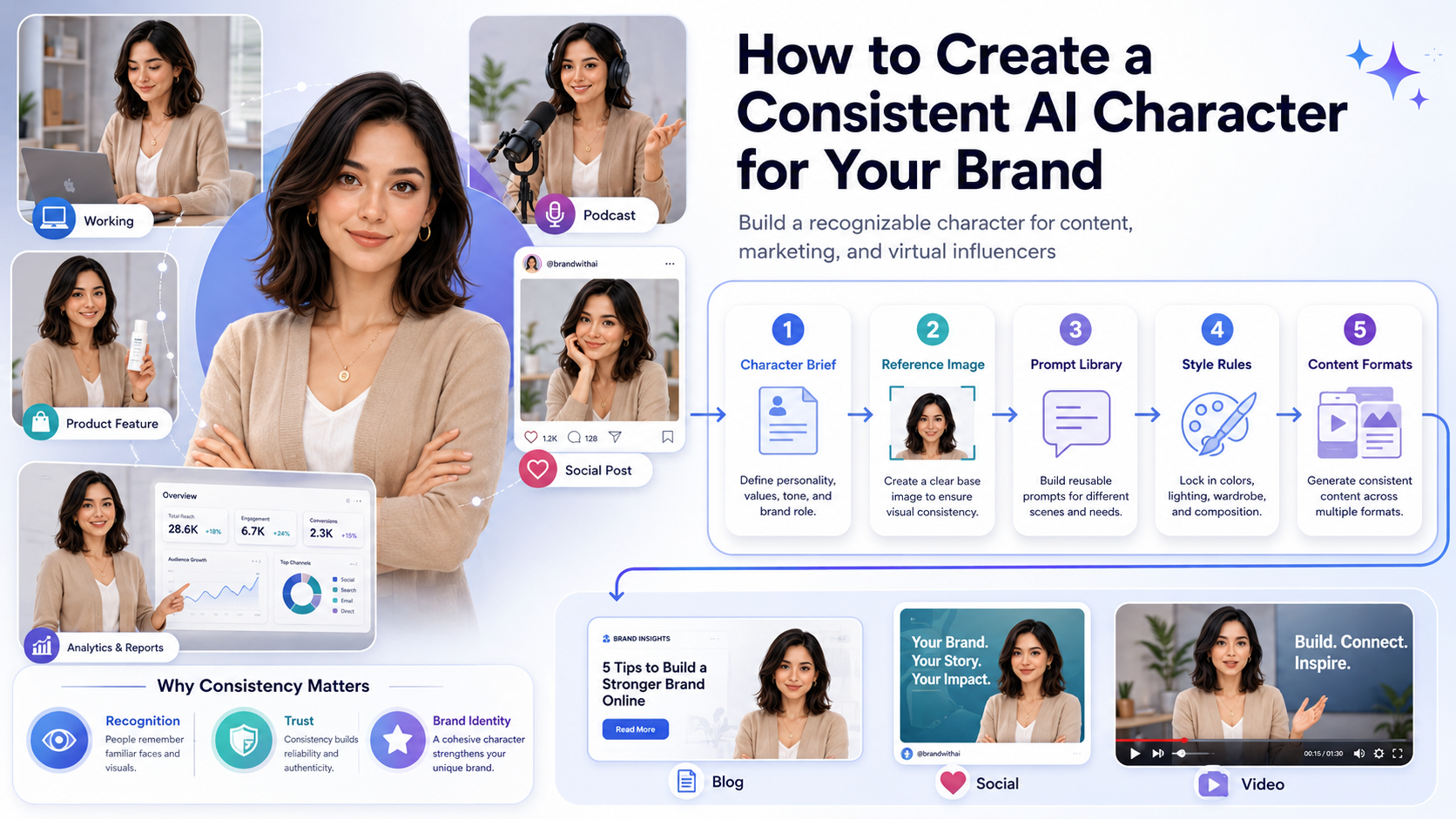
Creating one good AI-generated portrait is easy. Creating the exact same character again and again? That is where things get tricky.
If you are building a brand mascot, a virtual influencer, a fictional founder, or a recurring campaign spokesperson, character consistency matters. You need the same face, the same visual personality, and the same creative direction across multiple images.
Otherwise, your “brand character” starts looking like a shapeshifter with severe commitment issues.
A consistent AI character helps your audience recognize your content faster across blog images, social media posts, ads, landing pages, and digital products. This practical guide walks you through how to create a consistent AI character for your business without turning your workflow into a complicated prompt engineering swamp.
What Is a Consistent AI Character?
A consistent AI character is a generated person, mascot, or fictional identity that can appear in entirely different scenes while remaining completely recognizable.
While the character might change poses, outfits, locations, or facial expressions, the core identity parameters must stay the same. This includes:
- Face shape and bone structure
- Hair color and style
- Skin tone and textures
- General wardrobe aesthetic
- Personality expression and mood
The goal is to move past generating random visual decoration and start building a repeatable digital brand asset.
Step 1: Define Your Character Brief First
Do not open an AI tool and start prompting randomly. Typing generic phrases like “young founder working on laptop” will yield a completely different face every single time. Instead, lock down a simple text blueprint before generating a single pixel.
Example Character Brief: “Maya”
- Role: AI workflow coach for solopreneurs
- Age Range: Late 20s to early 30s
- Appearance: Professional, friendly, modern, shoulder-length dark hair
- Wardrobe Style: Minimalist smart-casual outfits, neutral colors (beige, white, black)
- Visual Mood: Clean SaaS editorial photography, soft natural lighting
- Things to Avoid: Heavy makeup, luxury influencer look, exaggerated poses
Step 2: Choose the Right Tool for the Job
Not every AI engine handles consistency well. For professional brand content, you need platforms that support advanced reference anchors rather than text-only processing.
Look for tools that feature Character References (like the --cref parameter in Midjourney v6), face-continuity modules (like RenderNet), or local model training (Stable Diffusion LoRAs). Choose your tool based on your technical comfort level rather than internet hype.
Step 3: Create a Master Reference Image
Your master reference image is the visual anchor of your character—think of it as a passport photo, but with professional styling.
This image should be:
- Perfectly clear and well-lit (soft studio or natural light)
- Front-facing or a simple three-quarter portrait angle
- Set against a solid, neutral, uncluttered background
Avoid using a first reference image that features intense shadows, busy patterns, or extreme angles. The AI will accidentally memorize those random details and force them into every future scene.
Step 4: Use a Modular Prompt Library
To generate different scenes efficiently, build a modular prompt library. Instead of writing a new prompt from scratch every day, you simply mix and match four pre-made text blocks:
1. Character Identity Module
This remains 100% identical in every single generation to anchor the face.
Maya, a friendly AI workflow coach, calm professional appearance, shoulder-length dark hair, wearing smart-casual neutral clothing
2. Visual Style Module
This locks down the photographic look across your entire website.
clean SaaS editorial photography style, soft natural lighting, minimalist environment, professional mood
3. Negative Prompt Module
This acts as a guardrail to eliminate common AI artifacts.
distorted hands, extra fingers, unreadable text, logos, harsh shadows, heavy makeup, unrealistic skin, exaggerated poses
4. Scene Variation Module (The Variable)
This is the only part of the prompt you change depending on your content needs.
- Option A:
working at a clean wooden desk, laptop open showing abstract graphs - Option B:
standing next to a white corporate board, explaining a simple workflow diagram - Option C:
holding a modern tablet, smiling confidently at the camera in a bright workspace
Step 5: Enforce Wardrobe and Environment Control
Clothing and environment play a massive role in human recognition. If your character wears a minimalist blazer today, a neon cyberpunk suit tomorrow, and a luxury gown next week, the identity breaks down even if the face stays the same.
Define a strict style guide for your character’s world:
- Wardrobe Rule: Stick to a simple palette (e.g., solid turtlenecks, neutral blazers, clean shirts).
- Setting Rule: Keep the environment relevant to your niche. For a solopreneur or SaaS brand, a bright home office, a clean co-working space, or an uncluttered digital dashboard background builds immediate contextual trust.
Common Mistakes to Avoid
- Changing the Face Description Over Time: If you alter the phrasing of your core character description between prompts, the AI will slowly drift away from the original identity. Keep the core identity string locked.
- Expecting Immediate Perfection: AI character consistency requires fine-tuning. You may need to generate multiple variations before finding the perfect blend of pose and facial structure. Save the best versions to use as secondary image references.
- Overcomplicating the Scenery: The more background details you add to your prompt text, the less computational power the AI allocates to maintaining the character’s facial details. Keep your backgrounds simple.
FAQ
Can I use my consistent AI character in video content?
Yes, but video adds complex temporal layers. The easiest workflow for solopreneurs is to generate stable, high-quality still images first, then use image-to-video tools (like Runway or Kling) to add subtle camera or character movements.
Does Google penalize websites that use AI-generated characters?
No. Google’s quality guidelines focus purely on value, originality, and user experience. A consistent AI character acting as a visual guide across your tutorials enhances your site’s branding and user navigation, which is a positive SEO signal.
What is the easiest way for a beginner to lock character faces?
The most approachable method is using Midjourney’s character reference feature. By adding --cref [URL of your master image] to the end of your prompt string, the engine automatically attempts to match the facial structure across entirely new text environments.
Read more: Best AI Image Generators in 2026

I am is an AI Author & Practitioner specializing in AI workflow automation, prompt engineering, and digital productivity. I help solopreneurs and content creators streamline their operations using practical, real-world AI strategies
2 thoughts on “How to Create a Consistent AI Character for Your Brand”