
Creating good visuals used to be one of those tasks that sounded simple until you actually had to do it.
You opened Canva, searched through stock photos, moved a headline three pixels to the left, changed it back, questioned your entire brand identity, and somehow lost 45 minutes of valuable business time.
AI image generators changed that game completely. However, most business owners get weak, generic, or distorted results not because the tool is useless, but because their prompts are too vague.
When you run a business by yourself, you need visuals for blog posts, landing pages, newsletters, ads, and product mockups. You do not have time to wrestle with an AI tool like it is a tiny digital octopus. The good news is that writing better AI image prompts is not complicated once you use a predictable, repeatable structure.
Why Precise AI Image Prompts Matter for Solopreneurs
When you operate as a solo founder, every small creative task competes with critical operational work. You might be drafting a newsletter in the morning, optimizing a landing page after lunch, and trying to make tomorrow’s social post look like a professional asset rather than an afterthought.
A strong, specific prompt ensures you create highly usable visuals on the very first try.
AI image tools are fast, but they are not mind readers. A lazy prompt like “business person using laptop” will almost always yield a generic, unnatural stock photo. A better prompt gives the engine clear boundaries, explaining exactly what the image is about, where it takes place, what style it should follow, and how the final layout should be framed.
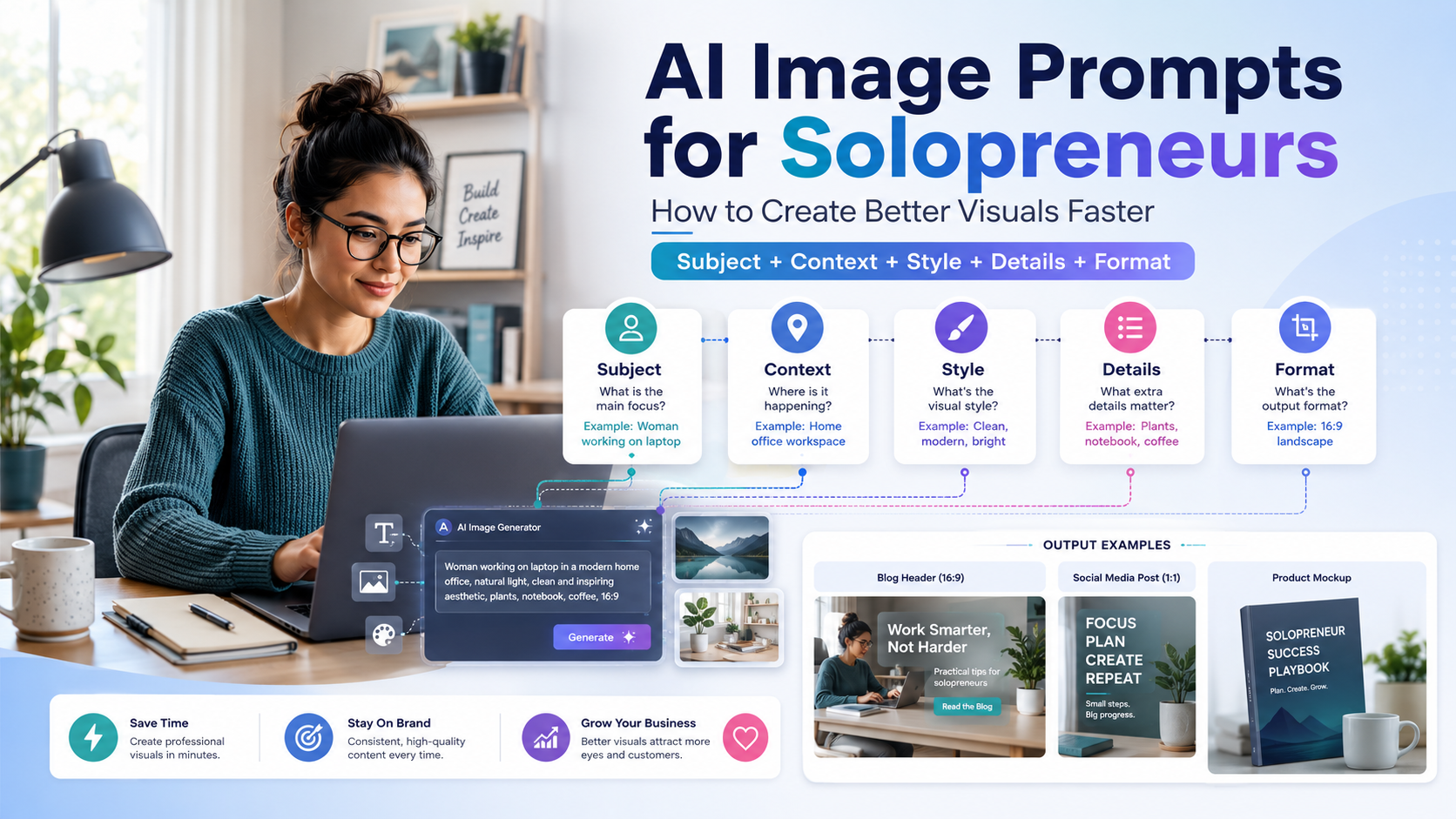
The 5-Part AI Image Prompt Formula
To get clean, professional imagery every single time, I use a simple 5-part framework:
Subject + Context + Style}+ Details}+ Format1. Subject (The Core Focus)
The subject is the primary anchor of your image. Avoid broad terms.
- Instead of:
entrepreneur working - Try:
solo female founder working from a compact home office
2. Context (The Story & Environment)
Context explains where the subject is and what action is taking place. This prevents the AI from placing your subject in a random, chaotic setting.
- Example:
sitting at a minimalist wooden desk, planning an automated email campaign on an open laptop
3. Style (The Visual Mood)
Style defines whether the output feels like a clean startup illustration, a high-end editorial photograph, or a realistic product mockup.
- Useful phrases:
Clean editorial photography,Modern SaaS website illustration,Soft studio lighting,Premium startup brand aesthetic.
4. Details (Eliminating Randomness)
Details steer the engine away from weird AI artifacts and clutter.
- Useful phrases:
Clean neutral background,No text inside the image,No logos,Uncluttered layout.
5. Format (The Aspect Ratio & Framing)
Format turns a generic image into an asset you can actually fit into your website design.
- Useful phrases:
16:9 blog header image,Square 1:1 social media post,Over-the-shoulder shot.
Copy-and-Paste AI Prompt Templates for Business Content
Here are the exact, tested prompt templates I use across my solo business workflows. You can copy these directly into Midjourney, Leonardo AI, or ChatGPT (DALL-E 3) and adjust the bracketed details to match your brand.
1. The Blog Header Template (16:9 Aspect Ratio)
Use this template to generate clean, high-converting feature images for your articles.
A wide 16:9 editorial lifestyle photograph of a solopreneur planning an AI-powered business workflow at a minimalist desk. The laptop is open, displaying abstract automation dashboard elements. Soft natural light, modern SaaS brand aesthetic, clean neutral background, calm productive mood. Absolutely no text, no logos, uncluttered composition --ar 16:9
2. The Social Media Graphic Template (Square 1:1)
This format gives you a strong visual anchor while leaving clean space to overlay your own headlines later in Canva or Figma.
A clean modern startup-style flat illustration showing a solo business owner organizing email marketing automations and content calendars on one unified dashboard. Soft pastel colors, simple shapes, strong centered composition, professional and friendly mood. No text, no logos --ar 1:1
3. The Digital Product Mockup Template
Perfect for creating high-converting visuals for ebooks, Notion templates, online courses, or lead magnets.
A realistic product mockup of a fictional SaaS analytics interface displayed beautifully on a modern laptop screen. Premium studio lighting, clean office desk background, warm professional aesthetic, depth of field. Clean layout, no readable text, no existing brand logos --ar 4:3
Common AI Image Prompt Mistakes to Avoid
Mistake 1: Cramming Too Many Ideas into One Image
It is highly tempting to force your entire business strategy into a single graphic. Prompts like “a founder automating sales, marketing, invoices, support, and social media at once” create absolute visual chaos. Focus wins. Pick one core action and let the AI render it cleanly.
Mistake 2: Leting the AI Render Text
While AI engines are improving, they still frequently produce melted, misspelled, or strange alien text inside images. To protect your brand authority, always include tags like no text or blank space for headline in your prompts, and add your typography manually during post-processing.
Mistake 3: Forgetting the Style Anchor
Consistency builds brand recognition. If your blog cover uses an illustration style today, a gritty dark photo tomorrow, and a neon cyberpunk graphic next week, your website will look scattered. Find one specific visual style that works for your brand assets, lock that exact prompt string down, and only swap the core subject parameter for new articles.
Final Thoughts: AI is the Tool, You Are the Director
For solopreneurs, mastering AI image prompting is a massive leverage skill. It completely removes the production bottleneck of searching through stale stock photo libraries or spending money on design queues that you don’t have the budget for yet.
However, remember that AI tools do not possess intrinsic brand taste—you have to provide it. By enforcing strict design constraints, defining your visual style guide, and using structured formulas, you can generate professional, production-ready brand assets entirely on your own terms.
FAQ
Will using AI-generated graphics hurt my website’s Google SEO rankings?
No. Google explicitly ranks content based on quality, user experience, and relevance—not the tools used to build the visuals. To maximize SEO value, ensure your generated images have small file sizes for fast page loading speed and include descriptive Alt Text.
Why does my AI character look completely different in every new prompt?
This happens because general-purpose generators treat every prompt as a completely fresh slate. If you need a stable identity for a virtual spokesperson or brand mascot, you must use advanced character reference features (--cref in Midjourney) or dedicated face-continuity platforms rather than typing standard text prompts.
What is the best free AI image generator for solopreneurs?
Leonardo AI offers an excellent free tier with access to cutting-edge models like FLUX. If you already subscribe to ChatGPT Plus, DALL-E 3 is highly capable and allows you to build out visual prompt formulas using casual conversational language.
I am is an AI Author & Practitioner specializing in AI workflow automation, prompt engineering, and digital productivity. I help solopreneurs and content creators streamline their operations using practical, real-world AI strategies
1 thought on “AI Image Prompts for Solopreneurs: How to Create Better Visuals Faster”